Bosch SR450 Station
The Bosch SR450 is a 4-DOF SCARA robot. It is controlled by the MARS control unit.
We created the package ctu_bosch_sr450 to control the robot.
The station is equipped with Basler cameras accessible over ethernet via the name camera-bosch.
Note
To verify camera functionality, acquire images, or work with settings, you can use the pylon viewer application. Launch it with the command /opt/pylon/bin/pylonviewer.
Please keep in mind:
The pylon Viewer application starts very slowly (taking tens of seconds).
If a camera is open in one program, it cannot be opened by another.
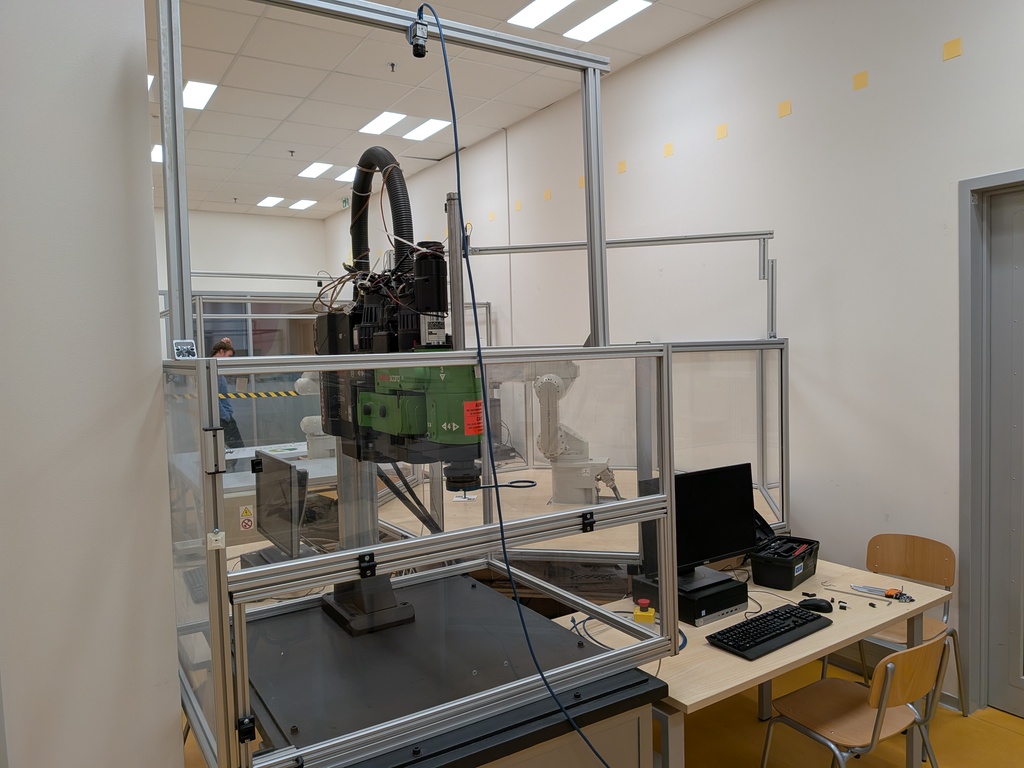
Bosch SR450 Robot
Installation
pip install ctu_bosch_sr450
Note
The ctu_bosch_sr450 package is pre-installed on the computer at the robotic station.
However, you can also install it on your personal computer for experimentation.
How to Start the Robot
Power up the robot with the red switch on the Mars control panel.
Create a
RobotBosch()instance and callinitialize().You will be prompted to press the yellow Arm Power button on the Mars control panel.
The robot will perform a homing sequence, after which it is ready for use.
Warning
If the robot behaves unexpectedly, immediately press the Emergency Stop button (red mushroom-shaped button).
Emergency Procedures
Finishing the work with the robot: To turn the robot off, call
soft_home()followed by theclose()methods. Then, turn the red switch off.Entering the cage: To enter the cage, you need to call the
release()function, which will power-off the motors and activate the brakes.Recovering from emergency stop or cage entry: Unblock the emergency stop button and/or close the cage. Press the red button called MotionStop on the Mars control panel. Press the yellow button called ArmPower on the Mars control panel. Continue with normal operation.
Recovering from a motor error: If the green LED above the motor axis is blinking and the red LED is on, there is a motor error. To reset the motors, call the
reset_motors()method.
Python Examples
Simple Move Command
from ctu_bosch_sr450 import RobotBosch

robot = RobotBosch()  # set argument tty_dev=None if you are not connected to robot
robot.initialize()  # initialize connection to the robot
robot.move_to_q([0.1, 0.0, 0.0, 0.0])  # move robot
robot.wait_for_motion_stop()
robot.close()  # close the connection
Forward and Inverse Kinematics
from ctu_bosch_sr450 import RobotBosch

robot = RobotBosch(tty_dev=None)  # initialize object without connection to the robot
x, y, z, phi = robot.fk([0, 0, 0, 0])  # compute forward kinematics
q = robot.ik([x, y, z, phi])[0]  # compute inverse kinematics, get one of the solutions
Grab a camera picture
You can easily capture an image from the camera associated with the robot using the robot interface itself. The library handles the camera connection automatically.
from ctu_bosch_sr450 import RobotBosch

robot = RobotBosch()  # initialize object without connection to the robot
robot.initialize()

# Grab an image from the camera
# This will automatically connect to and open the camera on the first call
img = robot.grab_image()

# 'img' is a NumPy array containing the image data.
# You can now process it, for example, using a library like OpenCV.
if img is not None:
    print(f"Successfully grabbed image with shape: {img.shape}")
robot.close()  # close the connection
Coordinate Systems and Joint Configuration
The library uses meters and radians for all values. The variable q is used to denote the joint configuration. The variables x, y, z, and phi are used to denote the position and orientation of the end-effector in the base frame. The orientation is given as a rotation around the z-axis of the base frame.
The reference base frame is located as shown in the figure below.
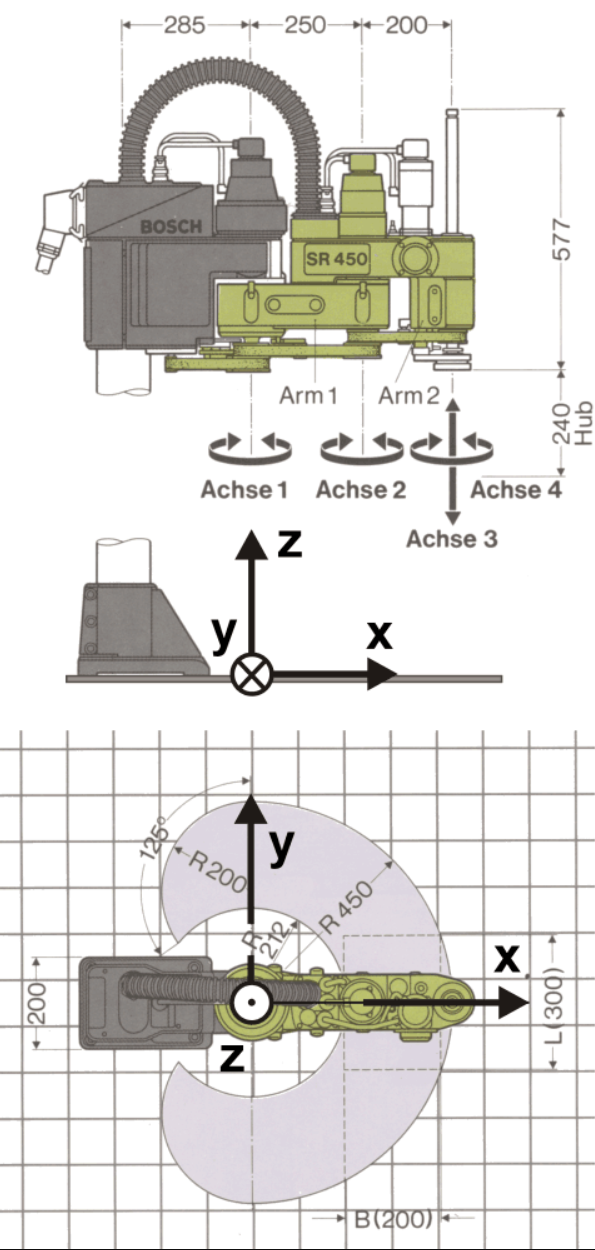
Bosch SR450 Base Frame
The first joint is revolute, and its angle is measured with respect to the x-axis of the base frame.
The second joint is revolute and is measured with respect to the previous link.
The third joint is prismatic and controls the height (i.e., motion in the z-axis).
The last joint is revolute and measured with respect to the x-axis of the base frame (i.e., not with respect to the previous link).